- Home Page /
- Office Products /
- Office & School Supplies /
- Writing & Correction Supplies /
- Moleskine Adobe Smart Notebook, Hard Cover, Plain/Blank...
0 ratings




Item #:
74012444
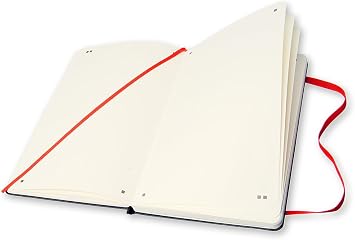
Moleskine Adobe Smart Notebook, Hard Cover, Plain/Blank, Large (5" x 8.25") Black, 176 Pages
Item #:
74012444
USD 40
Price Details
Excluding Shipping & Custom charges ( Shipping and custom charges will be calculated on checkout )
*All items will import from US
In stock
 Imported from USA store
QTY:
Only 6 items left in stock.
Order now and get it around Wednesday, June 24
Secured transaction
Ubuy works hard to protect your security and privacy. Our advanced payment security system ensures confidentiality by encrypting your information during transmission using AES (Advanced Encryption Standards) and SSL (Secure Socket Layer) protocols. Your payment details are 100% secure as we do not share your payment details with third party sellers.
Our Top Logistics Partners


Combines the flexibility & memory-enhancing tactile feedback of an old-school analog notebook w/ the convenience & shareability of digital note apps.

Fast
Shipping

Free
Return*

Secure Packaging

100% Original Products

PCI DSS Compliance

ISO 27001 Certified


Note: Step Down Voltage Transformer required for using electronics products of US store (110-120). Recommended power converters Buy Now.


What Stands Out
Creative Compatibility
Seamlessly connects with Adobe Creative Cloud, allowing users to digitize handwritten notes and sketches effortlessly, enhancing creativity and productivity for artists and designers.
Large Format
The extra-large size provides ample space for sketching, note-taking, and brainstorming, catering to professionals who need room to express their ideas freely without limitation.
Premium Quality
Constructed with a robust hard cover and high-quality paper, this tablet ensures durability and a luxurious feel, making it perfect for both everyday use and important presentations.
Product Details
- SMART NOTEBOOK: Combines the flexibility & memory-enhancing tactile feedback of an old-school analog notebook w/ the convenience & shareability of digital note apps. This smart notebook works seamlessly with the Moleskine Pen+ and Moleskine Notes app
- WITH NCODED TECHNOLOGY: Invisible Ncoded technology embedded within each page enables the Moleskine Pen+ to recognize where it is within the notebook and to transfer all your freehand notes from page to screen in real time via the Moleskine Notes app.
- FROM PAGE TO SCREEN: Companion app seamlessly transfers what's written on the notebook page to your device, digitizing your analog notes & allowing you to notate, share, search, edit, & organize your vision. The app is both Android & Apple compatible.
- MOLESKINE VERSATILITY: In addition to the iconic notebook, the Moleskine family of products includes both digital & analog writing & lifestyle technology, including smart notebooks & apps, bags, notebooks, travel & digital accessories & writing tools.
- MOLESKINE QUALITY: We're dedicated to culture, travel, memory, imagination, & personal identity—both physical & digital. We bring this commitment to our notebooks, bags, apps & smart pens & notebooks.
| Brand Name | Moleskine |
| Unit Count | 1.0 Count |
| Global Trade Identification Number | 08051272890297 |
| Manufacturer | Moleskine |
| Item Weight | 0.33 Kilograms |
| Number of Items | 1 |
| Color | Black |
| Theme | Book |
| Style | Adobe |
| Pattern | Solid Color |
| Ruling Type | Plain |
| Special Features | Hard Cover |
| Binding | Stationery |
| Brand | Moleskine |
| Special Feature | Hard Cover |
Who Should Buy?

-
Artists
Ideal for artists who value traditional paper and wish to digitize their drawings with Adobe integration.
-
Design Students
Useful for design students to sketch ideas and seamlessly transfer them to digital platforms for projects.
-
Creative Professionals
Great for creative professionals needing a reliable tool for brainstorming and capturing inspiration on-the-go.

-
Heavy Note-Takers
Not suitable for users requiring extensive pages, as 176 pages may not suffice for many notes.
-
Budget Shoppers
May not be ideal for budget-conscious individuals due to its premium pricing compared to regular notebooks.
-
Casual Users
Not recommended for casual users who don't need digital integration, making it overkill for simple notes.
Product Description
Have any Query? Chat with us
Customer Questions & Answers
-
Question:
What is the size of the Moleskine Adobe Creative Cloud Paper Tablet?
Answer: The Moleskine Adobe Creative Cloud Paper Tablet measures 7.5 x 9.75 inches. This extra-large format provides ample space for sketching, note-taking, or brainstorming. Its size is especially useful for creative professionals who need significant room to express their ideas visually. This tablet facilitates a large canvas for drawings that can be easily integrated into Adobe Creative Cloud applications, making it ideal for artists and designers who need to transfer their sketches into digital formats seamlessly. -
Question:
How does the Adobe Creative Cloud integration work with this paper tablet?
Answer: The Moleskine Adobe Creative Cloud Paper Tablet features technology that allows your handwritten notes and sketches to be scanned and sent directly to Adobe Creative Cloud. This integration enables users to convert their physical drawings into digital files instantly. Artists can benefit from this feature by editing their work in applications like Adobe Photoshop or Illustrator. This streamlined transition from paper to digital allows for enhanced productivity, especially when working on projects that require multiple iterations. -
Question:
What type of paper is used in Moleskine Adobe Creative Cloud Paper Tablet?
Answer: The Moleskine Adobe Creative Cloud Paper Tablet utilizes high-quality, acid-free paper designed to resist bleed-through, ensuring that your work remains crisp and clear on each page. The smooth texture of the paper allows for various writing and drawing instruments, including pens, pencils, and markers. This versatility makes it suitable for artists and anyone who enjoys journaling or note-taking, ensuring that the creative process is enjoyable and free from interruptions due to poor paper quality. -
Question:
Can I use multiple mediums on the Moleskine Adobe Creative Cloud Paper Tablet?
Answer: Yes, the Moleskine Adobe Creative Cloud Paper Tablet is compatible with various writing and drawing mediums, including pencils, pens, and markers. The specialized paper enhances the performance of these tools, providing a smooth experience that minimizes smudging and bleeding. Whether you're using watercolors for illustrations or fine-point pens for detailed drawings, this tablet allows for the seamless exploration of creativity, making it an excellent choice for a diverse range of artistic expressions. -
Question:
What are the primary uses for the Moleskine Adobe Creative Cloud Paper Tablet?
Answer: The Moleskine Adobe Creative Cloud Paper Tablet is ideal for artists, designers, students, and professionals who need to capture ideas, sketches, and notes on-the-go. Its design supports creativity through the process of brainstorming, drawing, and planning, while its Adobe integration facilitates transitioning those ideas into digital formats for further development. Many users find this tablet valuable for journaling, designing concepts, or developing storyboards, enhancing both personal and professional projects. -
Question:
Is the cover of the Moleskine Adobe Creative Cloud Paper Tablet durable?
Answer: Absolutely, the Moleskine Adobe Creative Cloud Paper Tablet features a hard cover that ensures durability and protection for your work inside. The robust cover means that it can withstand the rigors of travel and daily use without compromising the integrity of the pages. This makes it suitable for taking outdoors or on trips, providing peace of mind that your creative endeavors are well-protected regardless of the environment. -
Question:
Can I use the Moleskine Adobe Creative Cloud Paper Tablet for digital sketching?
Answer: Yes, you can absolutely use the Moleskine Adobe Creative Cloud Paper Tablet for digital sketching. The tablet allows you to create physical sketches that can be easily digitized using the Moleskine app, which integrates with Adobe Creative Cloud. This ability enables artists to maintain a tactile drawing experience while still taking advantage of digital tools for editing and refining their work. Ideal for those who love the feel of pen on paper but also want the benefits of digital art creation, it offers the best of both worlds. -
Question:
What is the page count of the Moleskine Adobe Creative Cloud Paper Tablet?
Answer: The Moleskine Adobe Creative Cloud Paper Tablet comes with a total of 176 pages. This ample page count provides plenty of space for extensive brainstorming, drawing, and note-taking. Artists and professionals can use the pages for multiple projects, goals, or sketching sessions, making it a practical choice for those engaged in regular creative work. With this number of pages, users can capture their thoughts and ideas over extended periods without needing to switch notebooks frequently. -
Question:
Where can I buy the Moleskine Adobe Creative Cloud Paper Tablet in Timor-Leste?
Answer: You can purchase the Moleskine Adobe Creative Cloud Paper Tablet, Extra Large, Black, Hard Cover 7.5 x 9.75 176 Pages from Ubuy. This online platform provides an easy way to browse and find various Moleskine products, ensuring a convenient shopping experience tailored to your needs. Ubuy often has a wide selection and reliable service, making it the go-to place for acquiring your new creative tools.
Moleskine Writing & Correction Supplies Editorial Review
The Moleskine Adobe Smart Notebook promises a seamless integration with the Creative Cloud-connected Moleskine app, allowing users to digitally capture their handwritten notes and drawings. However, some customers have expressed disappointment as the app is no longer available in the US, rendering the smart capabilities useless for them. Without the app, this notebook is simply a regular notebook. Despite this setback, others have still found value in this product. One reviewer shares that they were hoping for compatibility with LiveScribe technology, but acknowledge it was their mistake. They mention that taking pictures of their work to digitize it is an extra step compared to using a smart pen, but for those without the hardware, this notebook serves as a great alternative. On the other hand, there are some negative reviews indicating that the notebooks have expired two years ago. However, these comments are not well explained or elaborated upon. Positively, some customers rave about the notebook's quality. They mention that the cover stock is sturdy, the binding is tight and tough, and the pages feel delightful to write on. For these customers, the notebook was worth every penny and even described it as the best gift ever. Overall, reception for the Moleskine Adobe Smart Notebook seems mixed. While some may find value in its alternative digital capture capabilities, others may be disappointed by the lack of app availability. However, it does receive praise for its quality and tactile writing experience.
Customer Reviews & Ratings
123 customers ratings
-
5 Star
57%
-
4 Star
17%
-
3 Star
8%
-
2 Star
5%
-
1 Star
13%
Review this product
Share your thoughts with other customers
Pros
- Sturdy and high-quality cover stock
- Tight and durable binding
- Delightful to write on
Cons
- Creative Cloud-connected Moleskine app no longer available in the US
Product Price History
Important information
- Limitations : For products shipped internationally, please note that any manufacturer warranty may not be valid; manufacturer service options may not be available; product manuals, instructions, and safety warnings may not be in destination country languages; the products (and accompanying materials) may not be designed in accordance with destination country standards, specifications, and labeling requirements; and the products may not conform to destination country voltage and other electrical standards (requiring use of an adapter or converter if appropriate). The recipient is responsible for assuring that the product can be lawfully imported to the destination country. When ordering from Ubuy or its affiliates, the recipient is the importer of record and must comply with all laws and regulations of the destination country.
- Not all the products listed on Ubuy are for sale, as Ubuy is a global search engine. Products are subject to export/trade regulations.
USD 40
Order now and get it around Wednesday, June 24
This item is not restrict in my country.(Please click on above link if this item is not restrict in your country, So our team will review and allow.)
QTY:
Only 6 items left in stock.
Secured transaction
Ubuy works hard to protect your security and privacy. Our advanced payment security system ensures confidentiality by encrypting your information during transmission using AES (Advanced Encryption Standards) and SSL (Secure Socket Layer) protocols. Your payment details are 100% secure as we do not share your payment details with third party sellers.
Our Top Logistics Partners
Fastest cross-border delivery
Features & Benefits
- Combine analog and digital note-taking for enhanced flexibility.
- Ncoded technology enables real-time transfer of notes to your device.
- Compatible with Moleskine Pen+ and Moleskine Notes app.
- Easily digitize, share, search, and organize your notes.
- Versatile product line includes smart notebooks, accessories, and writing tools.
- Commitment to quality in culture, memory, and personal identity.